OverTheWire Bandit通关记录
Level0
ssh 用户名@连接地址 -p 指定端口ssh bandit0@bandit.labs.overthewire.org -p 2220
在随后的输入中输入密码
Level1
单破折号的文件如何在命令行中访问
cat ./-明确指定当前路径下的文件
Level2
如何访问--spaces in this filename--
cat ./--spaces\ in\ this\ filename--先指定当前路径下,然后将空格使用\转义
Level3
文件夹中塞了一个点开头的文件,被视作隐藏文件
ls -A

cat ...Hiding-From-You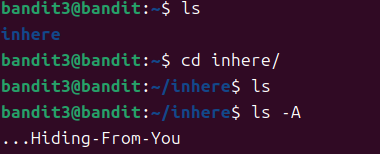
ls -A 显示所有文件
Level4
打开一个显示是乱码,用file查看所有文件,第七个是可读的
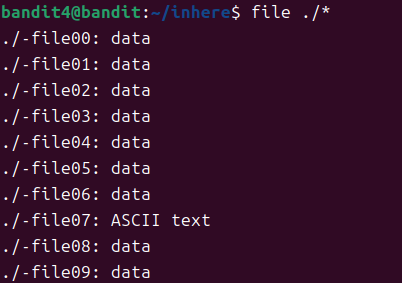
4oQYVPkxZOOEOO5pTW81FB8j8lxXGUQw
Level5
根据题目提示,文件不可执行,可读,大小为1033 bytes
find -not -executable -readable -size 1033c
c(字节)、w(字数)、b(块数)、k(KB)、M(MB)或G(GB)

HWasnPhtq9AVKe0dmk45nxy20cvUa6EG
Level6
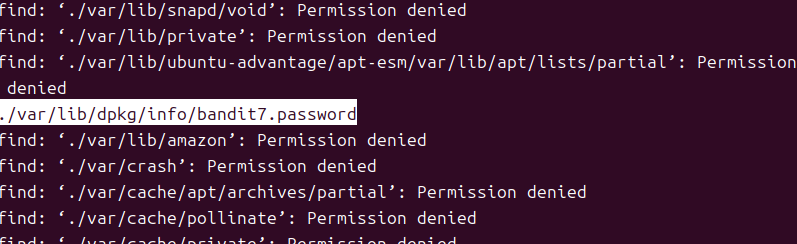
find -group bandit6 -user bandit7 -size 33c
Level7

cat data.txt | grep millionth
dfwvzFQi4mU0wfNbFOe9RoWskMLg7eEc
Level8
sort data.txt | uniq -u
Linux uniq 命令用于检查及删除文本文件中重复出现的行列,一般与 sort 命令结合使用。
uniq 可检查文本文件中重复出现的行列。
当重复的行并不相邻时,uniq 命令是不起作用的
-c或–count 在每列旁边显示该行重复出现的次数。
-u或–unique 仅显示出一次的行列。
4CKMh1JI91bUIZZPXDqGanal4xvAg0JM
Level9
strings - print the sequences of printable characters in files
利用strings筛选出所有可读文本,随后使用grep过滤
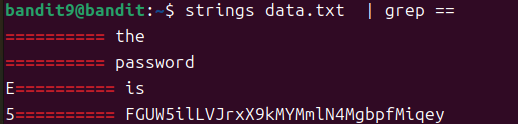
FGUW5ilLVJrxX9kMYMmlN4MgbpfMiqey
Level10
Base64 encode or decode FILE, or standard input, to standard output.
With no FILE, or when FILE is -, read standard input.

Mandatory  arguments  to  long  options are mandatory for short options too.

   -d, --decode
          decode data

Level11
Usage: tr [OPTION]… STRING1 [STRING2]
Translate, squeeze, and/or delete characters from standard input,
writing to standard output. STRING1 and STRING2 specify arrays of
characters ARRAY1 and ARRAY2 that control the action.
将字母列表1映射到字母列表2
可以用于实现ROT13
cat data.txt | tr 'a-zA-Z' 'n-za-mN-ZA-M'
7x16WNeHIi5YkIhWsfFIqoognUTyj9Q4
Level12
xxd creates a hex dump of a given file or standard input. It can also
convert a hex dump back to its original binary form.-r 用于执行反向操作,即将hexdump转为二进制数据
解压:
gzip -d 文件后缀需要为.gz。使用-v选项显示解压过程
bzip -d
tar -xvf
观察文件内容,发现这里是hexdump,可以使用xxd将其转为二进制数据,需要常见临时目录,然后在临时文件夹下操作
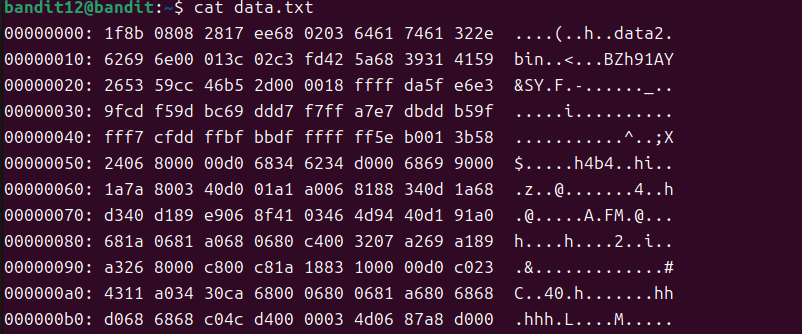
创建临时目录:mktemp -d
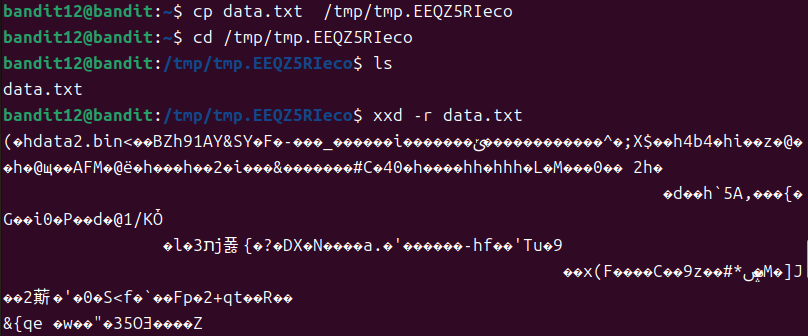
mktemp -d

cp data.txt /tmp/tmp.xxxxxxxx

cd /tmp/tmp.xxxxxxxxxx

xxd -r data.txt > data.bin
完成后使用file指令观察这个文件的格式

解压得到data文件,使用file查看是bzip2

继续观察解压后文件,是一个gzip文件

重命名后继续使用gzip解压

继续检测文件类型,是一个tar文件

随后重复上面的过程,直到拿到data8
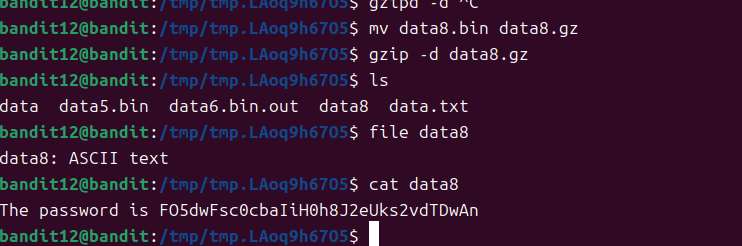
FO5dwFsc0cbaIiH0h8J2eUks2vdTDwAn
Level13
Linux scp 命令用于 Linux 之间复制文件和目录。
- -P port:注意是大写的P, port是指定数据传输用到的端口号
-i identity_file
Selects a file from which the identity (private key) for public
key authentication is read. You can also specify a public key
file to use the corresponding private key that is loaded in
ssh-agent(1) when the private key file is not present locally.
The default is ~/.ssh/id_rsa, ~/.ssh/id_ecdsa,
~/.ssh/id_ecdsa_sk, ~/.ssh/id_ed25519, ~/.ssh/id_ed25519_sk and
~/.ssh/id_dsa. Identity files may also be specified on a per-
host basis in the configuration file. It is possible to have
multiple -i options (and multiple identities specified in con‐
figuration files). If no certificates have been explicitly
specified by the CertificateFile directive, ssh will also try
to load certificate information from the filename obtained by
appending -cert.pub to identity filenames.
先登录到主机,看到文件名为sshkey.private

随后关闭连接,使用命令
scp -P 2220 bandit13@bandit.labs.overthewire.org:~/sshkey.private ~/
将远程主机上面的文件拷贝到本地家目录
随后在ssh里面使用这个密钥文件登录到远程主机
ssh -p 2220 bandit14@bandit.labs.overthewire.org -i sshkey.private
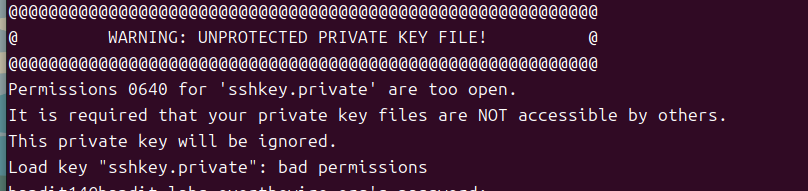
注意到提示说密钥文件权限不安全,使用chmod命令设置权限
chmod 600 sshkey.private
再次连接即可
Level14
根据上一关的提示,输入
cat /etc/bandit_pass/bandit14获取到本关的密码
随后根据提示,把密码发送到本地端口30000的服务
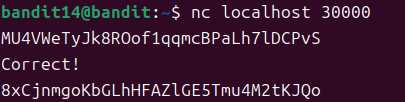
nc localhost 30000
使用nc连接
Level15
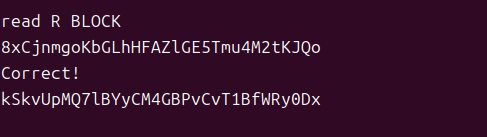
题目提示需要ssl连接,使用openssl的s_client进行连接
openssl s_client -connect localhost:300013
Level16
使用netstat -l 显示所有正在监听中的端口
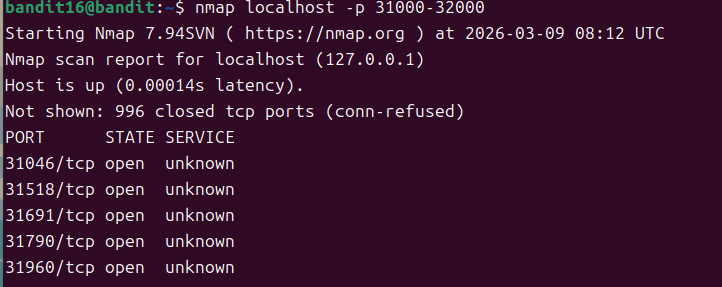
使用nmap localhost -p 31000-32000 按范围扫描开放端口
使用nmap localhost -p 31000-32000 -sV检测到了服务
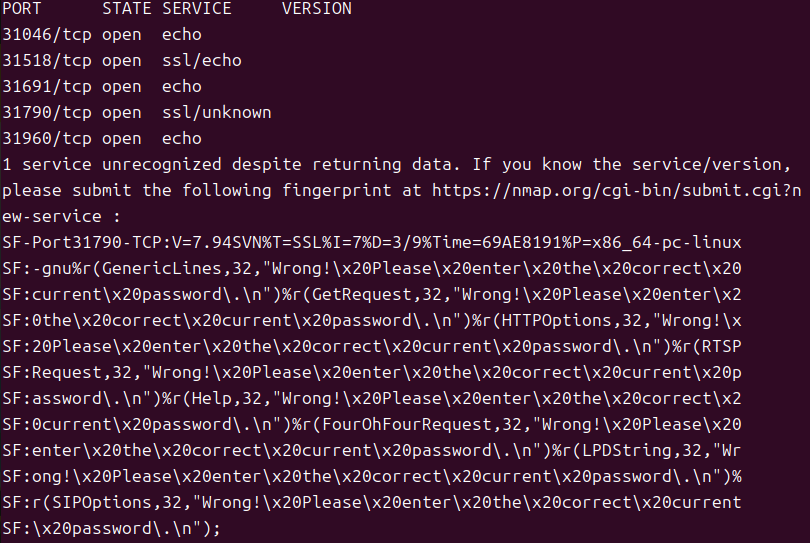
31790
openssl s_client -connect localhost:31790 -ign_eof-ign_eof禁止在输入文件尾部退出,避免返回KEYUPDATE
连接之后输入本关的密码,然后会返回一个rsa的私钥,将这个私钥保存下来,然后设置权限,作为下一关的连接认证文件
Level17
diff passwords.old passwords.new
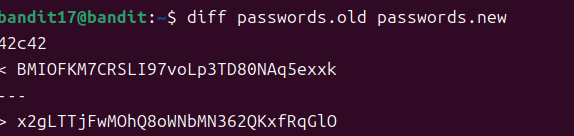
x2gLTTjFwMOhQ8oWNbMN362QKxfRqGlO
Level18
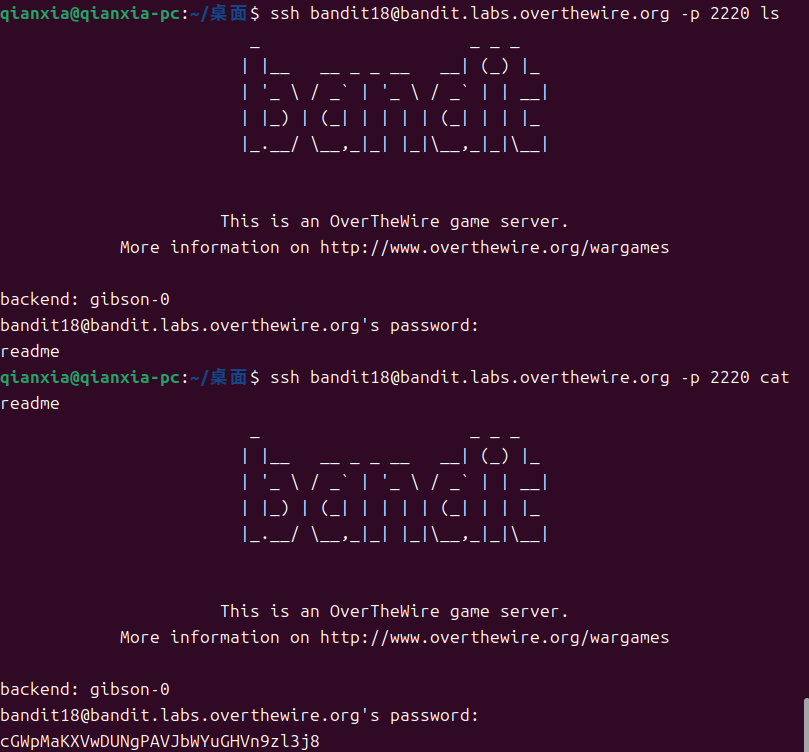
登录之后就会被断开连接, 根据提示,**.bashrc**被修改了
bash 在每次启动时都会加载
.bashrc文件的内容。通常用于保存别名。
SSH的命令手册中有这样的说明:
If a command is specified, it will be executed on the remote  host  in‐
stead  of  a  login shell.  A complete command line may be specified as
command, or it may have additional arguments.  If supplied,  the  argu‐
ments  will  be appended to the command, separated by spaces, before it
is sent to the server to be executed.
如果我们手动指定执行的命令,则不会执行shell,那么可以直接让远端执行命令,避免了被登出shell
Level19
根据提示,根目录下有一个可执行文件
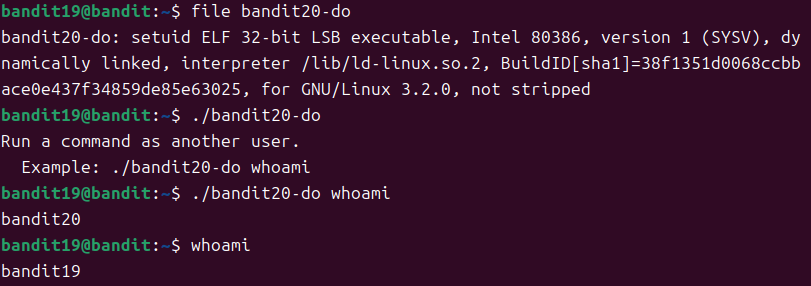
提示说可以作为另一个用户执行命令。
执行whoami后观察到,使用bandit20执行命令
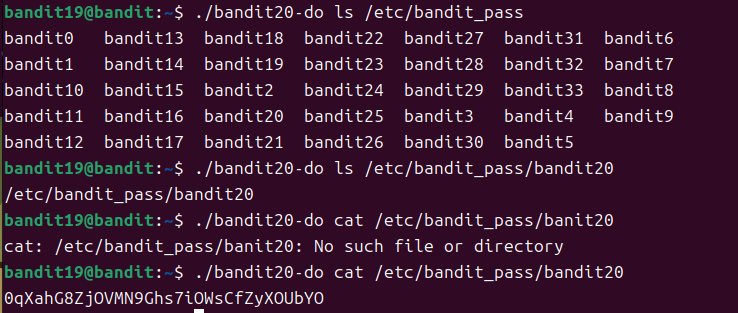
这里根据题目提示,找到对应目录,查询密码即可
Level20
根据题目说明,我们需要运行一个nc,用于监听端口,另一个运行题目提供的客户端。
这里一般需要两个终端,一个运行nc,然后发送正确的key给客户端,另一个运行客户端连接nc
可以使用screen命令完成在一个终端中运行多个程序的目的,man手册摘要如下:
Screen
When screen is called, it creates a single window with a shell in it
(or the specified command) and then gets out of your way so that you
can use the program as you normally would. Then, at any time, you can
create new (full-screen) windows with other programs in them (including
more shells), kill existing windows, view a list of windows, turn out‐
put logging on and off, copy-and-paste text between windows, view the
scrollback history, switch between windows in whatever manner you wish,
etc. All windows run their programs completely independent of each
other. Programs continue to run when their window is currently not vis‐
ible and even when the whole screen session is detached from the user’s
terminal.Screen does not understand the prefix C- to mean control, although this
notation is used in this manual for readability. Please use the caret
notation (^A instead of C-a) as arguments to e.g. the escape command or
the -e optionThe standard way to create a new window is to type C-a c. This creates
a new window running a shell and switches to that window immediately,
regardless of the state of the process running in the current window.
nc
-l Listen for an incoming connection rather than initiating a con‐
nection to a remote host.
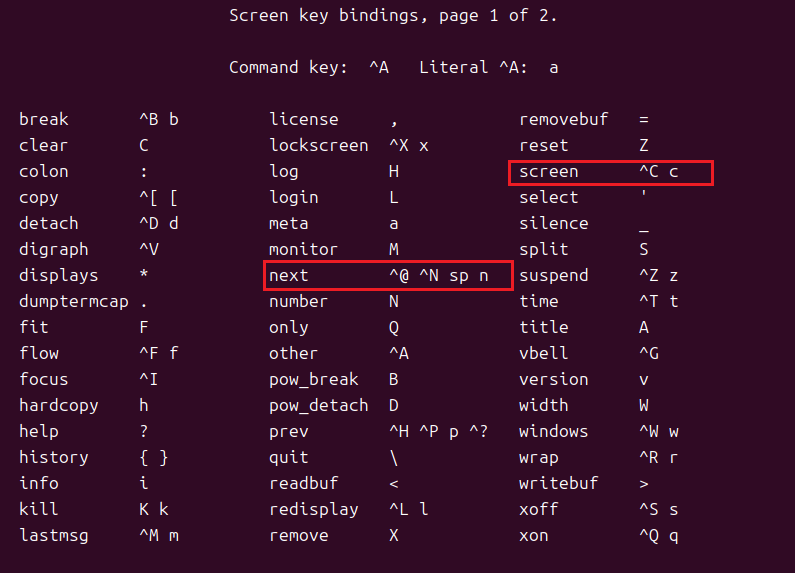
先运行screen,在这个终端中运行nc
nc -l 1234
这里监听1234端口,使用 ^A-C 键新建一个终端
在新建的终端中运行./suconnect 1234
连接到我们的服务器,随后回到nc的终端,^A-n 键切换到另一个终端
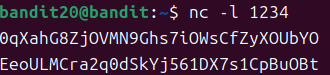
然后在这里发送本关的key,随后会立即收到客户端返回的内容

再次切换回到另一个终端,观察到程序的输出
接下来使用exit退出即可
Level21
根据题目提示,有cron任务被执行,并且提供了一个目录,下面存放着所有的任务
使用ls /etc/cron.d/ 观察一下内容

看到包含bandit22的字符串,使用如下命令观察任务内容:
cat /etc/cron.d/cronjob_bandit22

这里执行了一个脚本,观察脚本内容:

该脚本将level22的密码写到了临时目录中的一个文件,读取该临时文件的内容

Level22
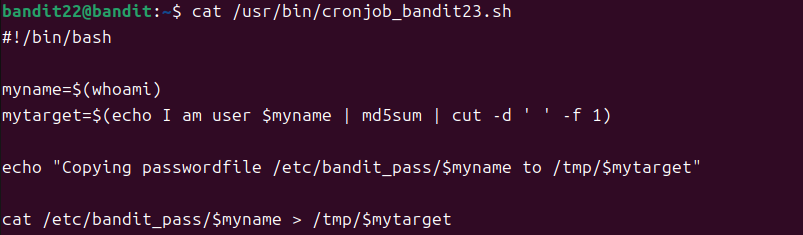
前面和上一关一样。直接看脚本
这里将密码写到一个变量中,这个变量是将一串字符串md5处理后以“空格”为分隔符,提取每一行输入的第 1 列内容。
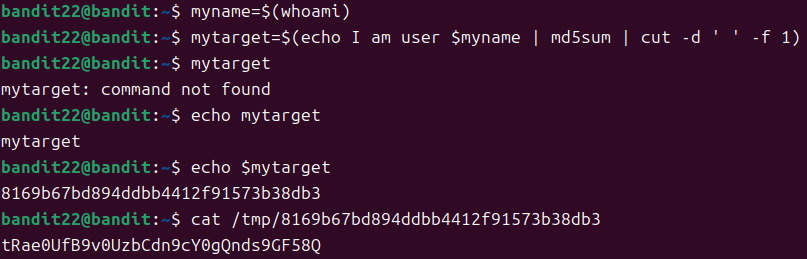
可以直接在终端中执行,然后设置变量,随后就可以读取变量的值
这里返回的是Level22的密码,因为myname是bandit22,让我们试着把myname改为bandit23
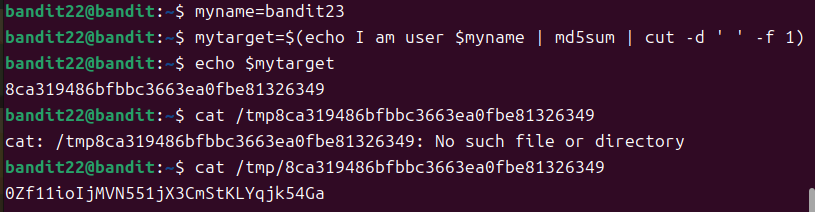
Level23
根据计划任务,找到cronjob_bandit24.sh读取其中的内容
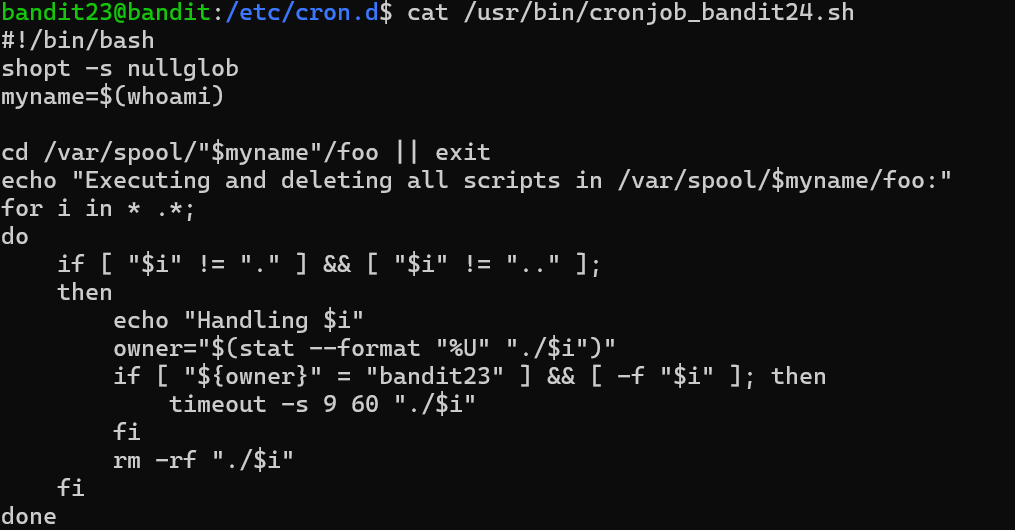
这里表示如果是bandit23创建的脚本则会执行,随后会删除它
观察到这个脚本是由bandit24用户执行的,所以可以直接读取bandit24的密码,使用脚本
mktemp -d
vim script.sh
#!/bin/bash
cat /etc/bandit_pass/bandit24 > /tmp/tmp.GBL9mKpGvi/password
chmod +x script.sh
chmod 777 /tmp/tmp.GBL9mKpGvi
cp script.sh /var/spool/bandit24/foo
随后等待一分钟,产生password文件

gb8KRRCsshuZXI0tUuR6ypOFjiZbf3G8
Level24
这道题要求暴力破解4位数,可以使用nc连接到本地的服务。
编写一个shell脚本,生成传给服务的数据
#!/bin/bash
for i in {0001..9999}
do
        echo "gb8KRRCsshuZXI0tUuR6ypOFjiZbf3G8 $i" >> code.txt
done
然后把生成的code.txt传给nc,nc的输出写到文件中
cat code.txt | nc localhost 30002 > output.txt
读取一下output.txt,文件末尾:
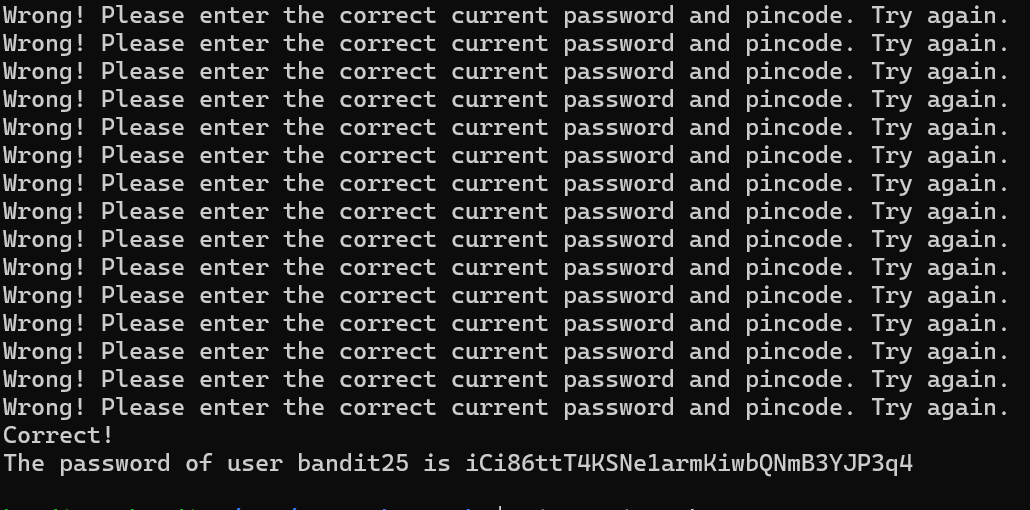
Level25
这道题说登录很简单,可以在登录后ls查看目录下,发现ssh密钥
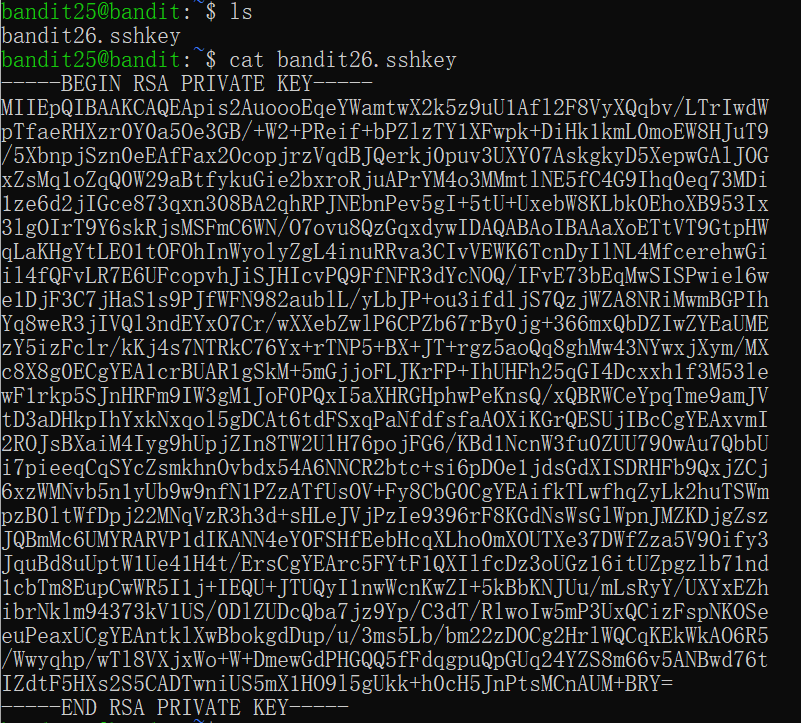
使用该密钥登录下一关,登录后立即断开
查看/etc/passwd文件中用户默认运行程序

默认执行/usr/bin/showtext,查看该文件内容:
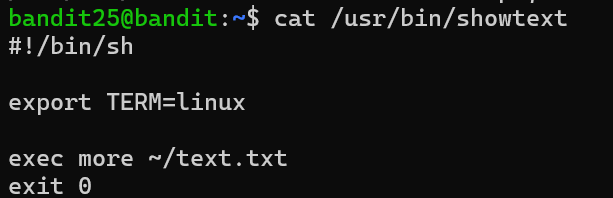
使用more命令执行bandit26用户家目录下的text.txt文件
这里因为more命令在不显示完整时,可以按v键运行vim。显示完整则直接退出
可以将cmd窗口拉小,使其显示不完整
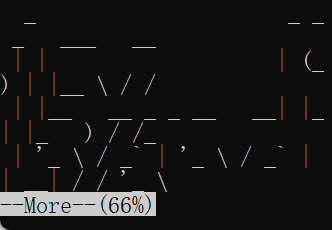
使用vim的命令模式输入
:set shell=/bin/bash
:shell
现在以bandit26身份运行了bash

s0773xxkk0MXfdqOfPRVr9L3jJBUOgCZ(bandit26自身的密码)
Level26
同时bandit26的目录下有一个bandit27-do文件,可以以bandit27身份执行命令

upsNCc7vzaRDx6oZC6GiR6ERwe1MowGB
Level27
考察git clone,连接端口为2220
格式如下:git clone <username>@<hostname>:<repository_path>.git
git clone ssh://bandit27-git@bandit.labs.overthewire.org:2220/home/bandit27-git/repo
请求密码的时候输入Level27的密码即可
下载到的README文件中包含了下一关的密码

Level28
按照上一关的方式拿到如下文件:
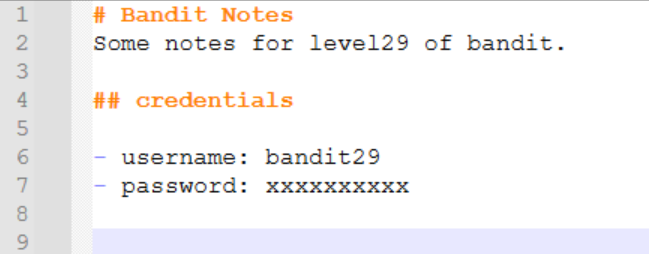
这里查看git的历史记录 git log
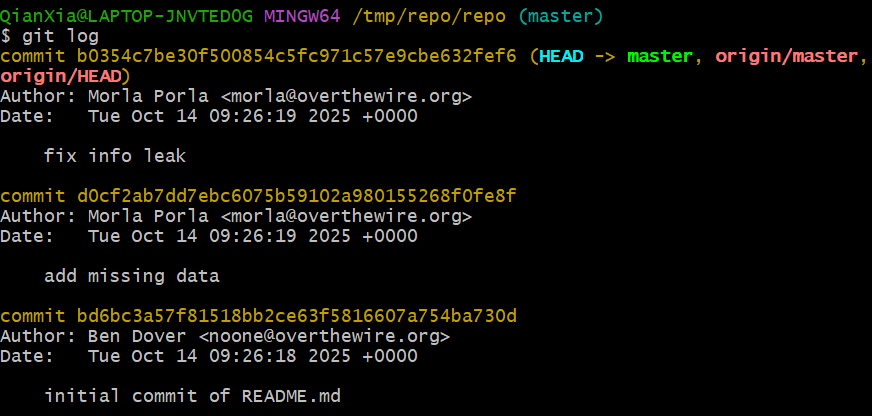
目前最新的提交是b0354c7be30f500854c5fc971c57e9cbe632fef6,这个提交信息写的是修复了信息泄露
所以可以查看一下历史提交修改了的内容
可使用git show 提交哈希 查看
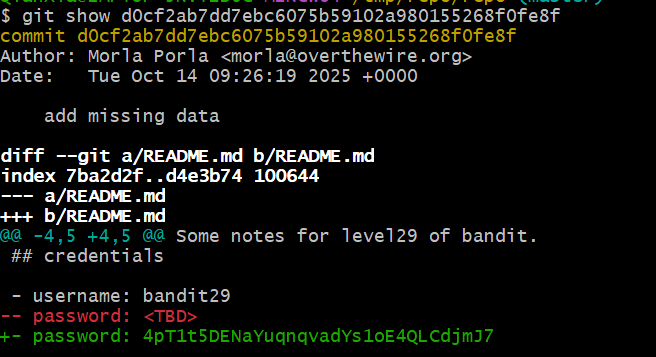
也可使用git log -p 查看
git log -p d0cf2ab7dd7ebc6075b59102a980155268f0fe8f
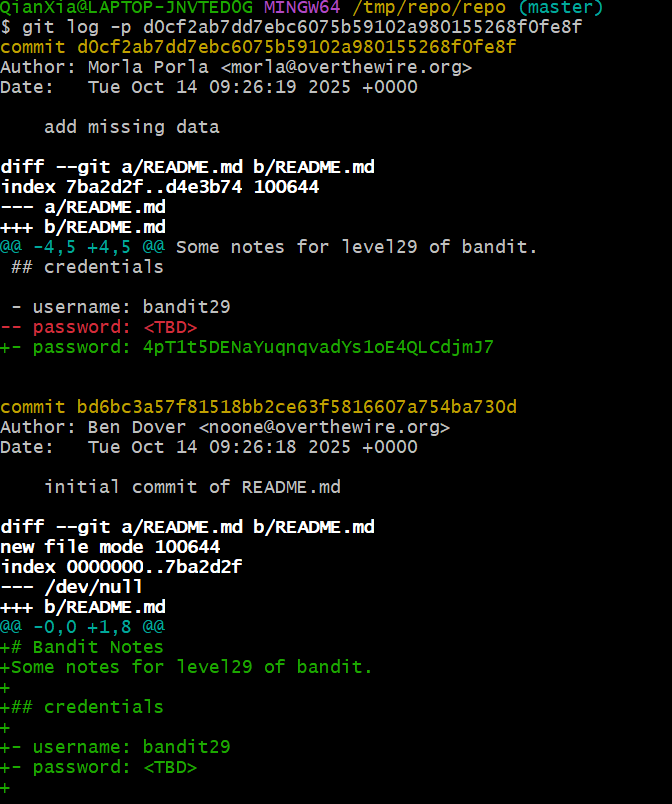
4pT1t5DENaYuqnqvadYs1oE4QLCdjmJ7
Level29
直接克隆到之后,README.md文件中没有密码,历史提交中没有记录
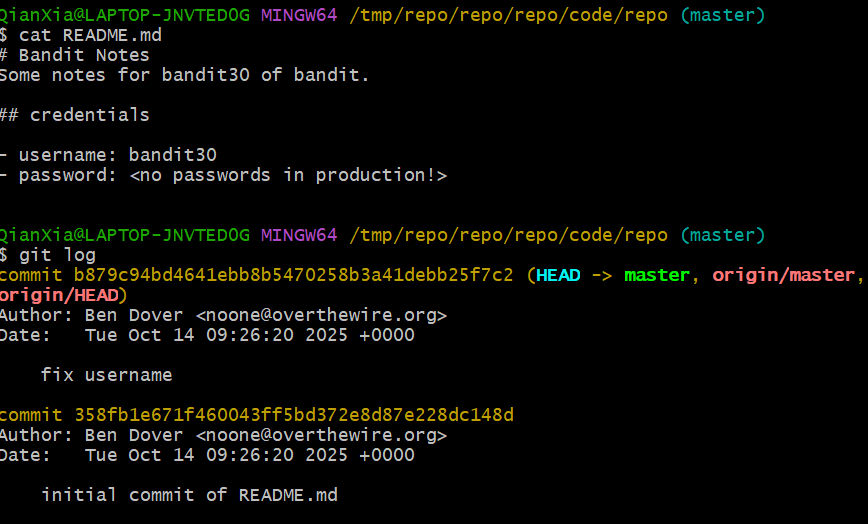
根据提示说生产环境中没有密码,查看所有分支
git branch -a

查看到有dev分支,checkout到dev
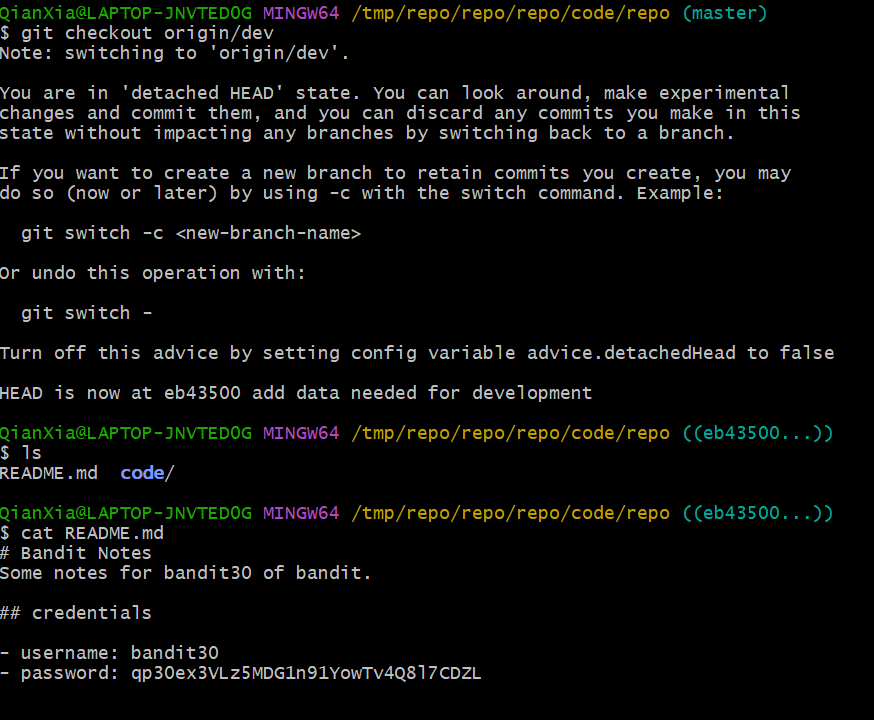
qp30ex3VLz5MDG1n91YowTv4Q8l7CDZL
Level30
克隆后看了一遍
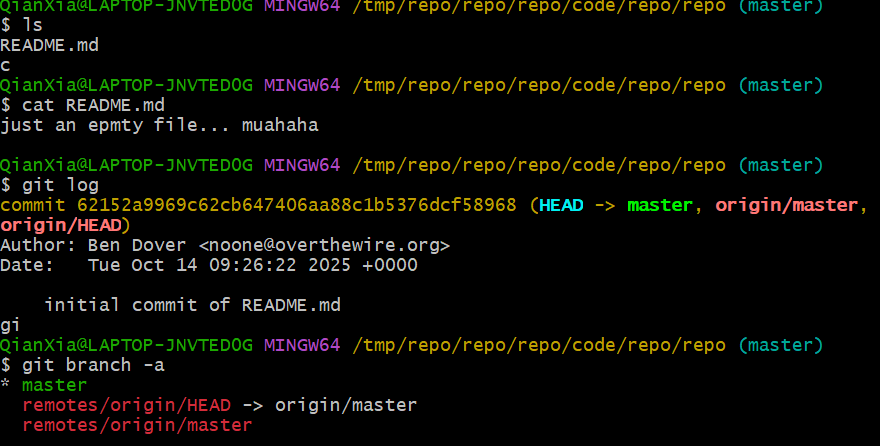
继续查tags

fb5S2xb7bRyFmAvQYQGEqsbhVyJqhnDy
Level31
克隆之后再README.md中得到文本:
This time your task is to push a file to the remote repository.
Details:
File name: key.txt
Content: ‘May I come in?’
Branch: master
提示我们需要向服务器上提交一个key.txt文件,内容是May I come in?
先创建key.txt文件,然后使用git add添加,随后使用git commit 提交,最后使用git push 推送
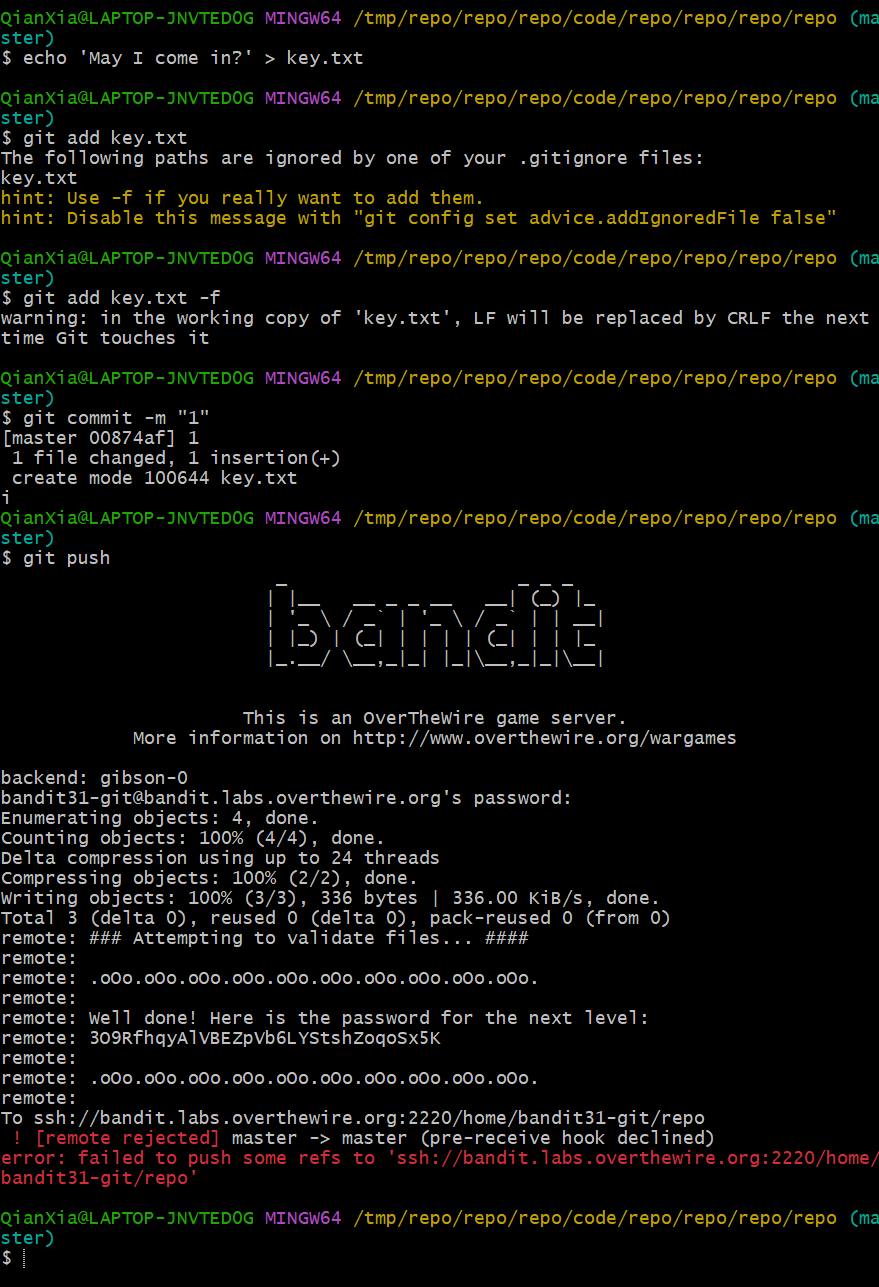
因为.gitignore文件将所有txt文件都做了排除,所有这里在add的时候会出现问题,根据提示可以使用参数-f强制添加
push后服务器返回下一关的密码
3O9RfhqyAlVBEZpVb6LYStshZoqoSx5K
Level32
给了我们一个特殊的shell,我们输入的所有内容都会被转成大写,而且提示无权限
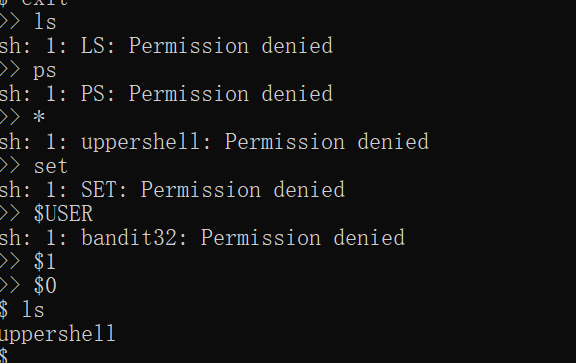
但变量可以使用,$0为sh,从而进入了正常shell
在这里访问/etc/bandit_pass,获得密钥

tQdtbs5D5i2vJwkO8mEyYEyTL8izoeJ0
Level33

